Do you want to know what a good CTR for Google Ads is and how to improve your ad results? If so, you’re in the right place.
Click-through rate (CTR) is an important measure of your paid search campaign’s performance. It tells you whether your ads connect with searchers or get scrolled past. A healthy CTR can indicate your ads are relevant to your audience, while a low CTR may suggest they need improvement.
Here’s the problem. Many advertisers struggle to judge their results because they don’t know the industry benchmarks. Others worry about small CTR drops without understanding what those changes mean for their campaigns.
In this guide, we’ll explain what CTR in Google Ads means, explore average CTR across industries, and show you what a good Google Ads click-through rate looks like. We’ll also cover the factors that affect your results, practical ways to improve your CTR, and common mistakes to avoid.
Let’s get into it.
What Is CTR in Google Ads?
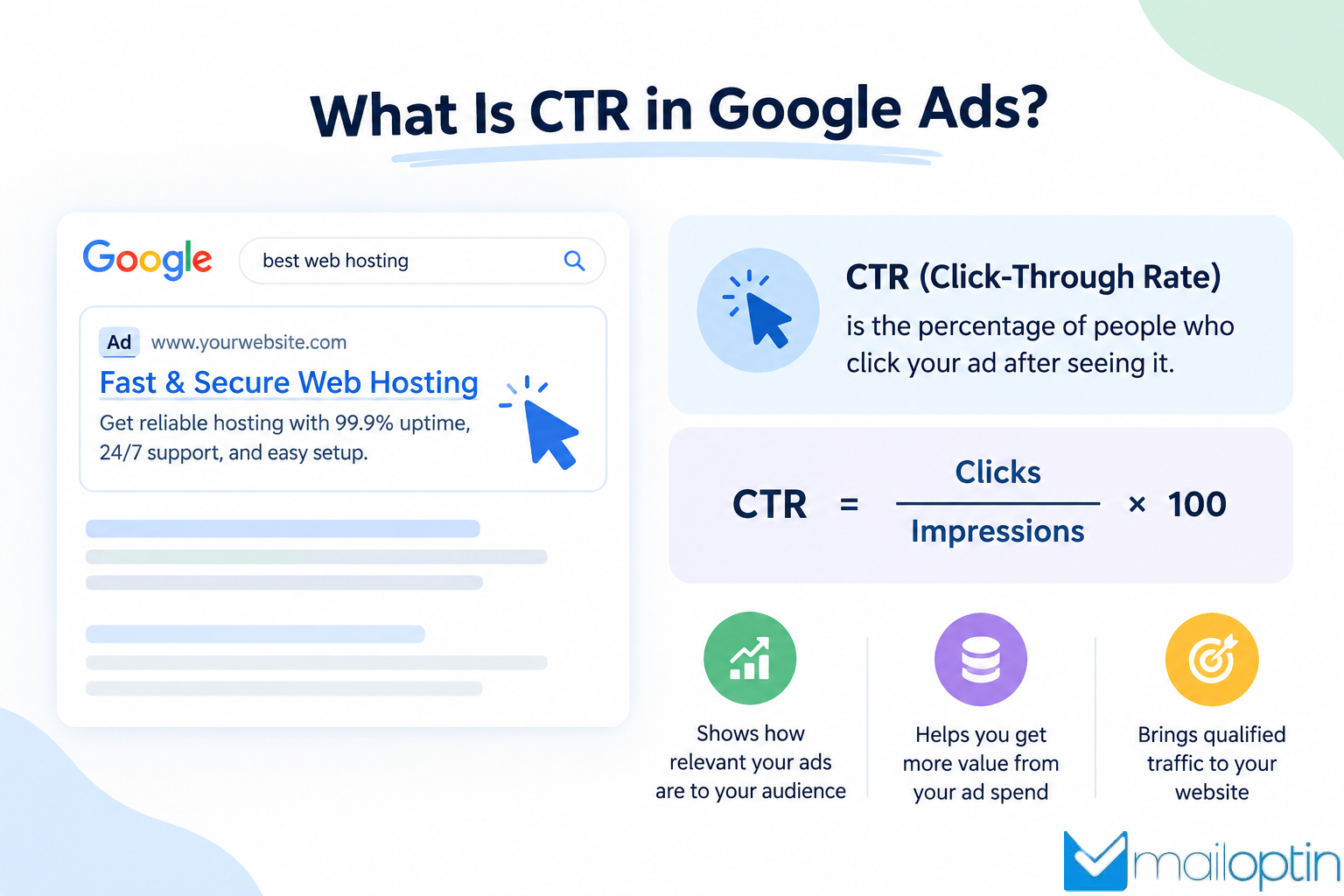
CTR in Google Ads stands for click-through rate. It shows the percentage of people who click your ad after seeing it. This metric helps you understand whether your ads catch people’s attention and give them a reason to visit your website.
An impression occurs whenever Google displays your ad. A click happens when someone clicks your ad to visit your website or take another action the ad format supports.
Here is the formula:
CTR = (Clicks ÷ Impressions) × 100
For example, imagine that your Google Search ad appears 1,000 times and receives 50 clicks. Your CTR would be 5%.
This metric shows whether your ads attract attention and encourage people to take action. When your CTR increases, it means that your ad copy, keywords, and audience targeting match what users want.
What Is a Good CTR for Google Ads?
A good CTR for Google Ads depends on your industry and campaign type.
For Google Search campaigns, a CTR of around 5% to 7% is a useful starting point, while rates above 7% indicate good performance in many industries. Some industries reach much higher rates, while others average lower.
According to WordStream’s 2026 benchmark report, the average CTR for Google Search ads is 6.64% across industries. The report also showed that industry averages varied considerably, from 5.87% for legal services to 12.75% for arts and entertainment.
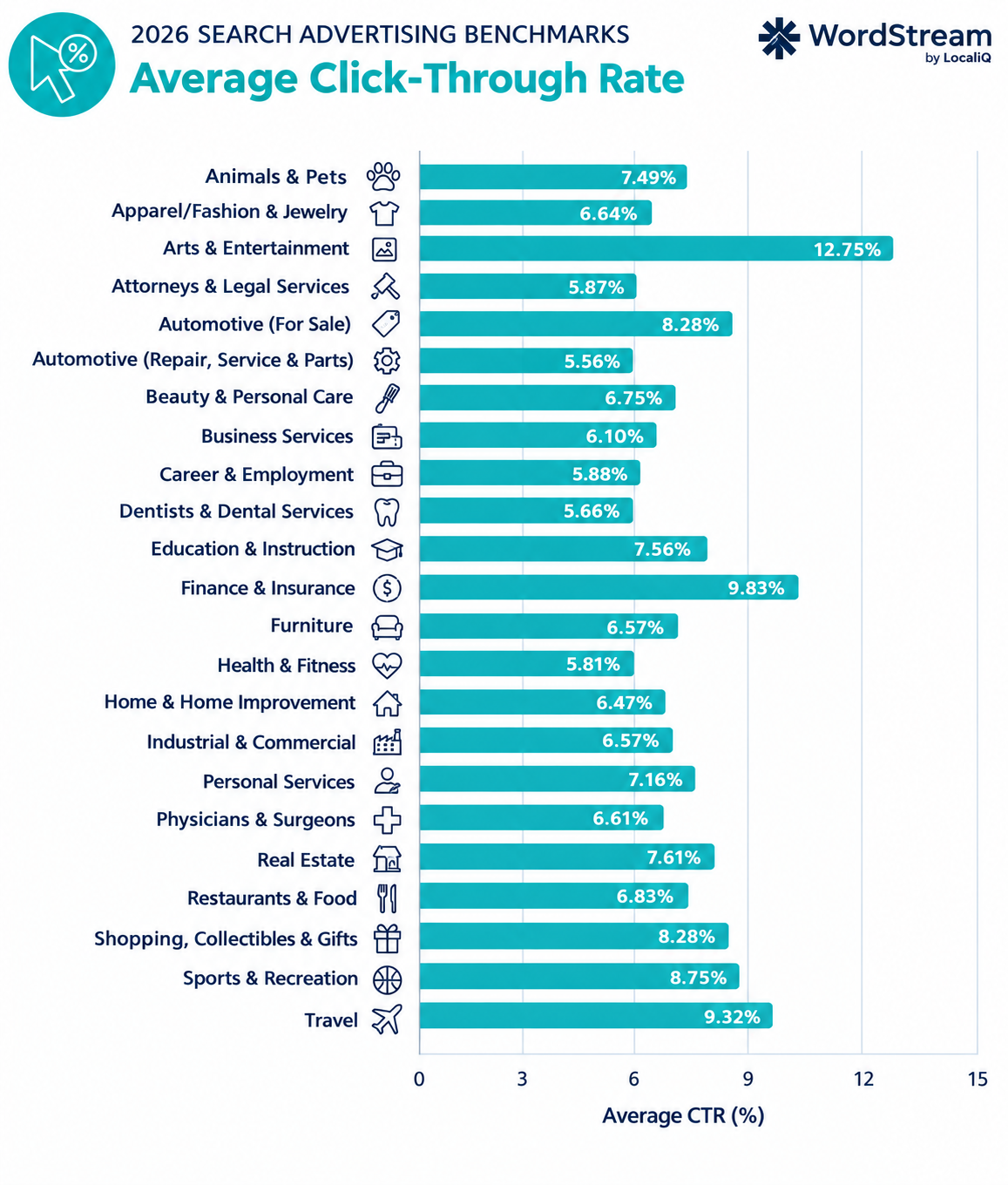
So how does your CTR compare? If you’re below your industry average, the next section covers the factors that influence CTR and the changes that move the needle.
Factors That Affect Your Google Ads CTR
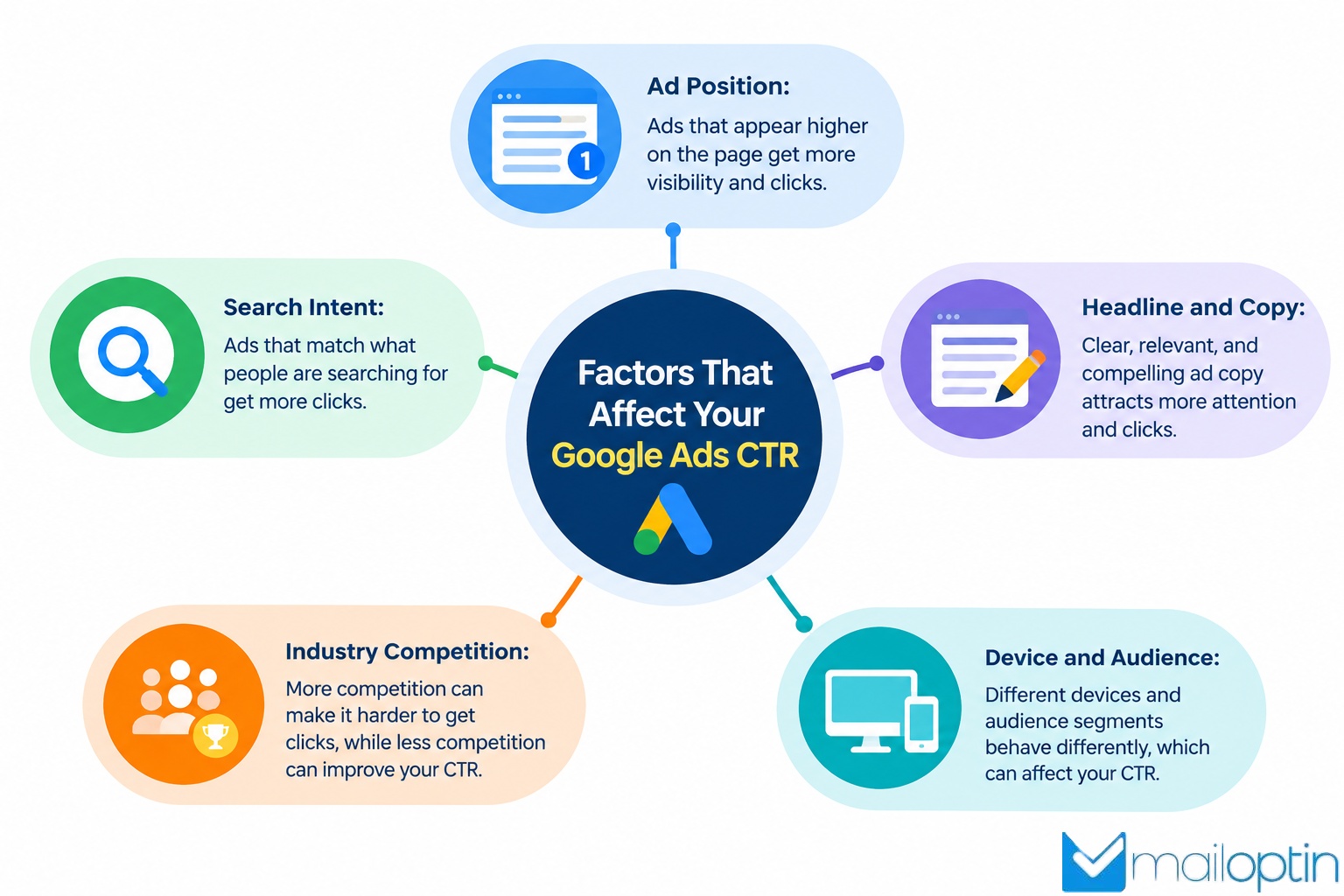
1. Ad Position: The position of your ad can affect how often users see and click it. Prominently placed ads get more attention, though results vary by search query, competing ads, and the results page layout.
However, aiming for the highest possible position isn’t always the most cost-effective strategy. Before increasing bids solely to improve CTR, consider your budget, conversion performance, and cost per acquisition.
2. Search Intent: Search intent refers to what a person wants to accomplish when entering a search query.
Someone searching for “buy office chairs online” may be ready to buy, while someone searching for “how to choose an office chair” may be looking for information.
If your ad matches the user’s intent, it’s more likely to attract a relevant click.
Review your keywords and search terms to determine whether your ads address what users are actually looking for.
3. Headline and Copy: Your messaging does a lot of the heavy lifting. A headline that matches what the searcher wants, backed by copy that gives them a clear reason to click, will perform better than a generic ad.
Compare two web hosting ads. The first says, “Fast Web Hosting From $3/Month” and highlights free website migration. The second says, “Choose Our Web Hosting Services.” The first ad gives users a clear starting price and an added benefit, while the second provides little information to help them decide.
Small details can make a difference. Numbers can grab attention, benefits show what users stand to gain, and a clear call to action tells them what to do next. Test different headlines and descriptions, then use your campaign data to see which messages attract more clicks.
4. Industry Competition: Your CTR also depends on how many advertisers compete for the same audience.
In a crowded market, several businesses may offer similar products or services. You may need to communicate your benefits more clearly to encourage users to choose your ad.
Study competing offers, identify what makes your business different, and ensure your ad communicates that advantage accurately.
5. Device and Audience: User behavior can differ across mobile devices, desktop computers, locations, and audience segments.
For example, mobile users may respond better to concise messaging and offers that are easy to act on from a phone. Desktop users may interact differently depending on the product and buying process.
Review available performance segments in Google Ads to identify meaningful differences. Use these insights to improve your targeting and messaging where appropriate.
How to Improve Your Google Ads CTR
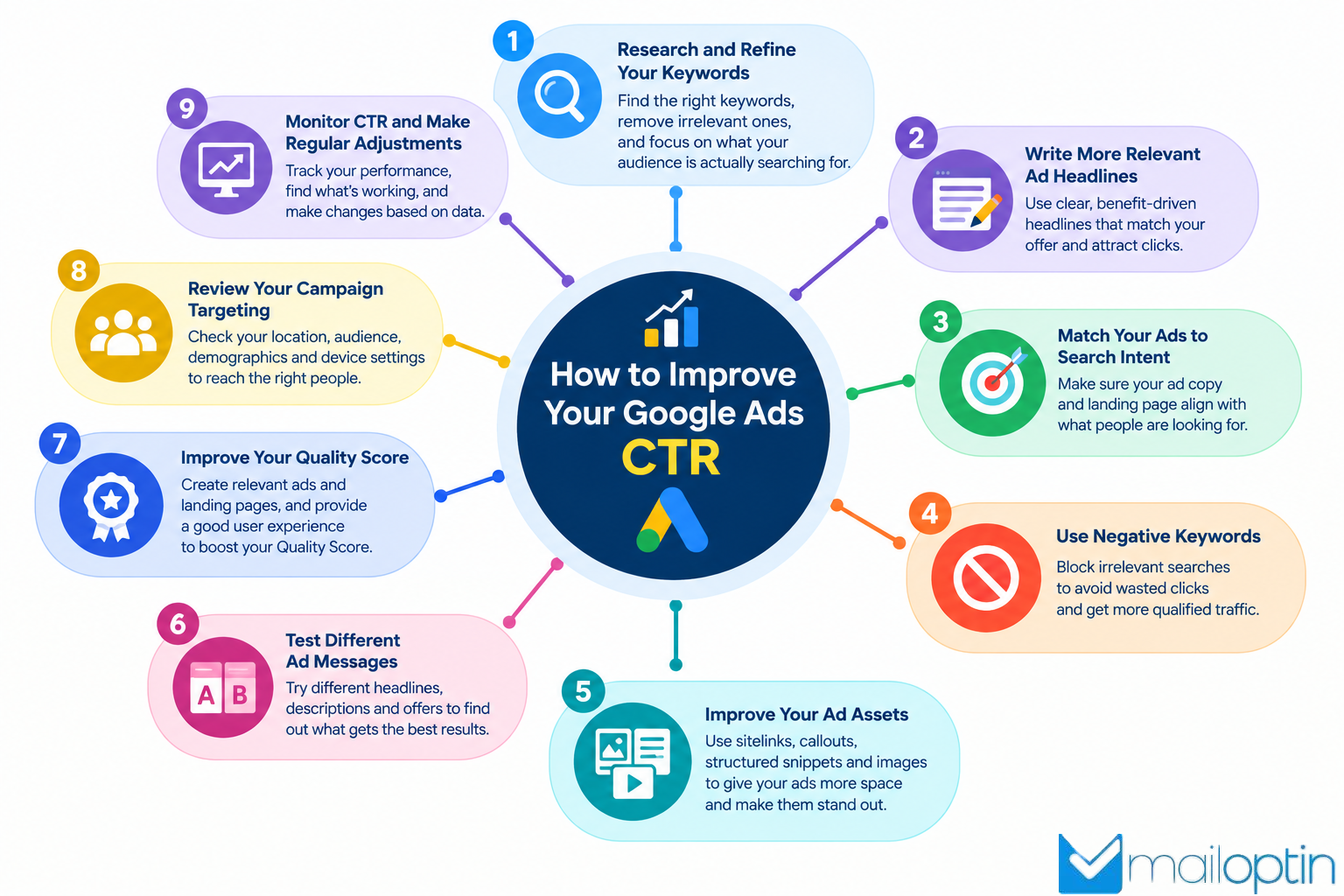
1. Research and Refine Your Keywords: Start by reviewing the keywords that trigger your ads. Check whether they match your products, services, and audience.
Use the search terms report in Google Ads to see the actual searches that led to your ads. This report can reveal searches that are unrelated to your offer.
For example, if you sell paid accounting software, searches for free accounting templates may attract people who are not interested in buying your product.
To improve your keyword strategy:
- Focus on search terms that match your offer.
- Use more specific keywords when they match your audience’s intent.
- Add negative keywords to exclude irrelevant searches.
- Review keyword performance regularly.
- Separate unrelated keyword themes into suitable ad groups.
Avoid adding keywords just because they receive many searches. Relevant traffic is more valuable than clicks from people unlikely to become customers.
2. Write More Relevant Ad Headlines: Your headline is a major part of your ad message. It should tell users what you offer and why it may meet their needs.
Instead of a vague headline like “Quality You Can Trust” or “Your Success Is Our Priority,” use a message that describes your service or product.
For example: “Get Your Website Indexed in Days with CrawlWP” tells a searcher exactly what you do and how fast you can help.
Write several relevant headlines and descriptions for your Responsive Search Ads. Highlight genuine benefits, explain what makes your offer useful, and match the wording to your target keywords.
Also test different messages to learn which ones attract relevant clicks and drive conversions.
3. Match Your Ads to Search Intent: Search intent refers to what a person wants to accomplish when they enter a search query.
Some people want information, while others want to compare products or make a purchase. Your ads should reflect these differences.
For example, consider these searches:
| Search Query | Likely intent | Suitable ad message |
| What is email marketing? | Informational | Learn the basics of email marketing |
| Best email marketing software | Commercial research | Compare email marketing features |
| Buy email marketing software | Transactional | Explore plans and pricing |
When your ad answers the user’s immediate need, it gives them a clearer reason to click.
Review your search terms and group keywords by intent. This can help you create more relevant ads instead of showing the same message to everyone.
4. Use Negative Keywords: Negative keywords prevent your ads from showing for searches that do not match your campaign goals.
For example, a company selling premium online courses may want to exclude searches containing terms such as “free” if those searches consistently attract people who are not interested in paid courses.
However, do not exclude a word without reviewing its meaning and performance. Someone searching for “free trial accounting software” may still become a paying customer.
Review your search terms report, identify irrelevant queries, and add suitable negative keywords. This can reduce unwanted impressions and clicks while helping you focus your budget on more relevant searches.
5. Improve Your Ad Assets: Google Ads allows advertisers to add assets that provide more information alongside their ads. Depending on the campaign and eligibility, these may include sitelinks, callouts, structured snippets, phone numbers, and location information.
These details can help users understand your offer before clicking. For example, an online store may use sitelinks to direct users to popular product categories, while a local service company may display its phone number or location.
Choose assets that support your advertising goal. Keep the information accurate and ensure that the linked pages provide what users expect.
6. Test Different Ad Messages: You may not know which message will attract the best audience until you test it.
Create variations that highlight different benefits, offers, or calls to action. For example, one ad could focus on affordable pricing, while another highlights product features or customer support.
Compare the results over a suitable period and with enough data to make a reasonable decision. When reviewing your tests, consider:
- CTR to see which ad attracts more clicks relative to impressions.
- Conversion rate to see which ad generates more desired actions.
- Cost per conversion to understand how much you pay for each result.
- Conversion value to determine whether the traffic contributes to revenue.
Do not choose an ad based on CTR alone. An ad with fewer clicks may generate more sales if it attracts people with high buying intent.
7. Improve Your Quality Score: Quality Score is a diagnostic rating in Google Ads that helps advertisers assess the quality of their Search campaigns. It uses three main components: expected CTR, ad relevance, and landing page experience.
To improve these areas, make sure your keywords, ads, and landing pages work together.
For example, if your ad promotes website hosting, the landing page should explain the hosting plans, features, and prices rather than take visitors to an unrelated page.
Review the available Quality Score components for your keywords and address any weaknesses. However, remember that Quality Score isn’t a campaign goal on its own, and a higher score doesn’t guarantee a specific ad position or CPC.
8. Review Your Campaign Targeting: Your ads should reach people who are likely to benefit from your offer. Check the locations, languages, audiences, and other targeting settings used in your campaigns. If your business serves only customers in a specific area, make sure your settings support that goal.
You should also review device performance. If mobile users click your ads but rarely complete a purchase, investigate the mobile landing page, checkout process, and offer relevance before making major bidding changes.
Use actual campaign data to guide your decisions rather than assuming that a particular device or audience always performs better.
9. Monitor CTR and Make Regular Adjustments: Your Google Ads CTR can change as competition, search behavior, and campaign settings change.
Review your performance regularly to identify falling CTR, irrelevant searches, and ads that no longer attract the right audience.
Compare similar date ranges and account for seasonal changes before concluding. For example, comparing a holiday shopping period with a quiet month may not fairly reflect performance.
Make measured changes, allow enough time for useful data to accumulate, and document what you learn. This approach can improve campaign performance without unnecessary changes.
Common Google Ads CTR Mistakes to Avoid

Most CTR problems come from a handful of repeated mistakes. Spot them early, and you save weeks of budget on ads that never would have worked.
Below are the ones I see most often.
1. Focusing on CTR Alone: A high CTR may look good in your Google Ads report, but it does not always mean your campaign is successful. What matters is whether those clicks lead to sales, inquiries, sign-ups, or other actions that support your business goals.
For example, an online store might run an ad offering a gift with every order. The offer could attract plenty of clicks, but some visitors may leave without buying anything. As a result, the store spends money on clicks without generating enough sales to cover its advertising costs.
To avoid this, look beyond CTR when measuring your campaign performance. Track your conversion rate, cost per acquisition, and return on ad spend (ROAS) to see whether your ads are bringing in valuable customers. A lower CTR can still deliver better results if it attracts people who are more likely to buy.
2. Using Broad Match Without Guardrails: Broad match allows Google to show your ads for searches related to your keywords, even when the search terms do not contain the exact words you selected. This can help you reach more potential customers, but it may also attract people who are not interested in your offer.
Without suitable negative keywords, your ads may appear for irrelevant searches, driving more impressions but fewer clicks from the right audience.
To avoid this, review your search terms report regularly and add unrelated queries as negative keywords where appropriate. This helps you focus your advertising budget on more relevant searches and may improve your CTR over time.
3. Writing Headlines for the Brand, Not the Searcher: Headlines that talk about the company (“Award-Winning Team,” “Since 2009”) say little about what the user gets. Searchers care about their problem, their timeline, and their budget. Lead with the outcome and keep the company story for the landing page.
4. Sending Every Ad to the Homepage: It’s the easiest link to paste and the fastest way to kill CTR and conversions. Someone who searched for a specific product wants that product, not a maze of menus. Send each ad to the page that matches the search, even if that means building several landing pages.
5. Ignoring the Mobile Experience: A large share of searches happen on phones, and mobile CTR suffers when your ad or landing page loads slowly or looks cramped.
Check how your ads and pages appear on a phone, and trim anything that slows them down. A page that takes more than a few seconds to load loses users before they ever see your offer.
6. Skipping Ad Assets: Google Ads assets let you add useful details to your ads, such as links to specific website pages, special offers, and information about your products or services. They are free to add and can make your ads more informative, giving people more reasons to click.
For example, sitelinks can direct users to your pricing or contact page, while callouts can highlight benefits such as free delivery or 24/7 support. Without relevant assets, your ads may miss opportunities to provide information that helps users choose your business.
Add suitable sitelinks, callouts, and structured snippets to your campaigns. Review them regularly to ensure the information is accurate and relevant. Although these assets don’t guarantee a higher CTR, they can improve your ad’s visibility and drive more relevant clicks.
7. Never Reviewing Your Data: Some accounts run the same ads for a year without a look at the numbers. CTR drifts, competitors change, and seasonal demand shifts, yet the ads stay frozen. Set a monthly review. Read the search terms, check asset ratings, and retire anything that has stopped pulling its weight.
Make the Most of Your Google Ads Traffic With MailOptin
Getting clicks from Google Ads is a good start. But what happens after visitors arrive on your site?
Some read a page, look around, and leave without buying or contacting you. That traffic costs you money.
You can give those visitors another reason to come back by collecting their email addresses and following up with useful content or offers. MailOptin makes that possible. It is a WordPress plugin designed to capture leads through targeted popups and subscription forms.
Below are a few ways MailOptin helps you get more value from the traffic you paid for:
1. Create targeted popups for landing pages: Display a popup that matches the offer in your Google Ads campaign. For example, if your ad promotes web hosting, invite visitors to subscribe for hosting tips or updates on your hosting plans.
2. Collect email addresses with optin forms: Add email subscription forms to blog posts, landing pages, sidebars, or notification bars. These forms let interested visitors stay in touch with your business, even when they are not ready to buy.
3. Show offers at the right time: MailOptin supports display triggers such as exit intent, time spent on site, and scroll depth. Use these triggers to show a relevant message when visitors show interest in your content or seem ready to leave.
4. Test different popup designs and messages: MailOptin includes A/B testing, which lets you compare different optin campaigns. Test headlines, offers, and form designs to see which versions attract more subscribers.
5. Follow up with email newsletters: MailOptin can send email broadcasts and automated notifications when you publish new blog posts. You can also connect it to supported email marketing services, such as Mailchimp, ActiveCampaign, and MailerLite, to manage subscribers and send follow-up campaigns.
For example, imagine you run a Google Ads campaign promoting a WordPress membership plugin. A visitor clicks your ad, reads your landing page, but leaves without purchasing. You could use MailOptin to display a relevant popup inviting the visitor to subscribe for membership website tips. With their consent, you can then send useful emails and product updates.
This approach gives you another chance to engage visitors who don’t convert on their first visit.
Frequently Asked Questions About Google Ads CTR
Q1. How Do I Check CTR in Google Ads?
To check CTR in Google Ads, sign in to your account and open the campaign you want to review. Go to the Campaigns, Ad groups, Ads, or Keywords section, depending on the data you need. Find the CTR column to see the percentage of impressions that resulted in clicks. You can also adjust the date range to compare performance over time.
Q2. Can a High CTR Still Lead to Poor Results?
Yes. Your ad may attract many clicks without generating sales, leads, or other valuable actions. Track conversion rate, cost per conversion, and revenue alongside CTR to see whether the campaign meets your goals.
Q3. How Often Should I Review My Google Ads CTR?
Check CTR regularly, but avoid making major changes based on short periods or limited data. Weekly reviews can help you spot early trends, while longer comparisons can reveal whether changes improve performance over time. Your review schedule should also reflect campaign volume and business seasonality.
Q4. How do I know if I have a good CTR on Google Ads?
Compare your rate to three things: your industry average, your own past performance, and your conversion rate. If you beat the benchmark and those clicks turn into leads or sales, your CTR is doing its job. If you beat it but conversions stay flat, the extra clicks are not the right ones.
Q5. How Can I Improve My Google Ads CTR?
You can improve your Google Ads CTR by writing relevant headlines, matching your ad copy to search intent, choosing suitable keywords, and adding relevant negative keywords. You should also test different ad messages, review your search terms report, and use relevant ad assets such as sitelinks and callouts. Monitor your results to find out which changes attract more qualified clicks.
Q6. What Is the Difference Between CTR and Conversion Rate?
CTR measures the percentage of ad impressions that result in clicks. Conversion rate measures the percentage of clicks or visits that result in a desired action, such as a purchase, inquiry, or sign-up. CTR shows how well your ad attracts clicks, while conversion rate shows how effectively your website turns visitors into leads or customers.
Conclusion
So, what is a good click-through rate for Google Ads? If you came here hoping for one magic number, I have some bad news. There isn’t one.
What there is, though, is a clear target. A good CTR meets or beats your industry benchmark and brings the right people to your site. For search campaigns, aim for 7% to 9%, with the 6.64% cross-industry average as your floor. If you’re sitting below that, don’t panic. You now know where to look.
The rest comes down to a handful of habits. Write headlines that say what searchers actually want. Point every ad at a page that matches the search. Clean up your search terms with negatives. Stretch your ad with extensions. Change one thing at a time, then let it work.
And avoid the traps. Don’t chase CTR on its own, because clicks without buyers are just expensive traffic. Don’t dump everyone on your homepage. Don’t cram five different themes into one ad group. Watch your conversion rate so a pretty CTR never fools you.
One last thing. A high click-through rate on Google Ads gets people to your site, but that’s only half the job. Turning those visitors into subscribers is where the real payoff lives. That’s exactly what MailOptin handles, with popups, subscription forms, and email follow-ups that squeeze more value from the traffic you already paid for.
Here’s my advice: pick two changes from this guide and try them this week. Then measure. Small, steady gains in your click-through rate for Google Ads beat one big overhaul every time. Keep testing, keep watching those benchmarks, and your campaigns will keep getting better.