-

How to Open Gravity Forms Within a Popup/Lightbox/Modal in WordPress
Gravity Forms makes it easy to create forms and embed them in WordPress posts and pages. This guide shows you how to display the forms in a lightbox, popup or modal. To follow along, ensure that you have installed MailOptin on your WordPress website. Displaying Gravity Forms in a Popup Open Gravity Forms and copy… Read more
-
How to Display Ninja Forms in a Popup in WordPress
Ninja Forms makes it easy to create forms and embed them in WordPress posts and pages. This guide shows you how to display the forms in a lightbox, popup or modal. To follow along, ensure that you have installed MailOptin on your WordPress website. Displaying Ninja Forms in a Popup Open Ninja Forms and copy… Read more
-
How to Display Contact Form 7 in a Popup in WordPress
Contact Form 7 makes it easy to create contact forms and embed them in WordPress posts and pages. A contact form on your website is a great way to communicate with your visitors. But some people may need an extra nudge to fill out a contact form to reach out with questions, problems, or general… Read more
-
How to Display Caldera Forms in a Popup in WordPress
Caldera Forms makes it easy to create forms and embed them in WordPress posts and pages. This guide shows you how to display the forms in a lightbox, popup or modal. To follow along, ensure that you have installed MailOptin on your WordPress website. Displaying Caldera Forms in a Popup Open Caldera Forms and copy… Read more
-
How to Open Formidable Forms in a Popup/Lightbox/Modal in WordPress
Formidable Forms makes it easy to create forms and embed them in WordPress posts and pages. This guide shows you how to display the forms in a lightbox, popup or modal. To follow along, ensure that you have installed MailOptin on your WordPress website. Displaying Formidable Forms in a Popup Open Formidable forms and copy… Read more
-
How to Open WPForms Within a Popup/Lightbox/Modal in WordPress
WPForms makes it easy to create forms and embed them in WordPress posts and pages. This guide shows you how to display the forms in a lightbox, popup or modal. To follow along, ensure that you have installed MailOptin on your WordPress website. Displaying WPForms in a Popup Open WPForms and copy the shortcode of… Read more
-
How to Hide Your Opt-in Campaigns from Existing Subscribers
Do your newsletter subscription campaigns keep popping up on your website even after a user has subscribed? It is not only annoying to your website visitors but also a waste of valuable website real estate. This article walks you through very simple steps that you can take to hide the opt-in forms after a website… Read more
-

9+ Social Media Sharing Plugins for WordPress
In an era where innovation and advancement thrive, carrying out tasks is more comfortable than it used to be. Thanks to the internet, business owners are now realizing the importance of establishing an online presence. The online world is filled with folks trying to gain knowledge or find a solution to a particular problem they… Read more
-
How to Get More Out of Your Website’s Existing Traffic
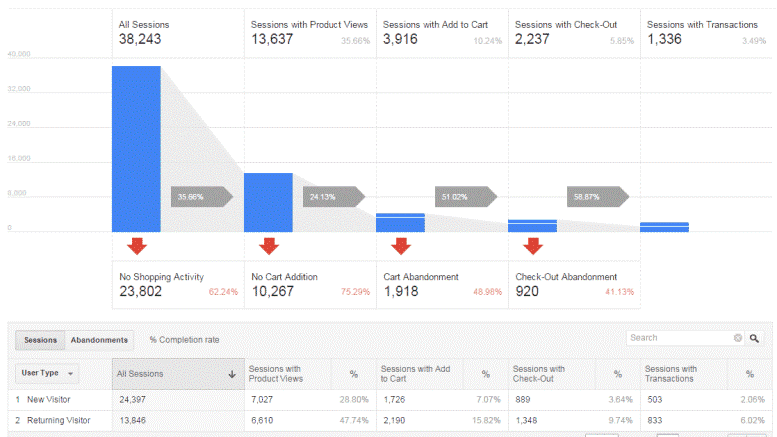
Most people focus on getting more traffic, and often increase their marketing budget to achieve that. But how about first optimising your website to get the most out of the traffic you’re already getting? Without spending a single penny on another ad campaign, you can improve the conversion rate on your website to get a… Read more
-

Keep Spam in the Cupboard: Avoiding Spam Filters
I get it. You spend hours crafting email campaigns, or lots of money paying someone to do it for you. You develop an awesome lead magnet and you start growing your email list. All sounds good, right? But what if the emails you are sending don’t even make it in front of your subscriber’s, let… Read more
-
8 Creative Ways to Increase Interactivity in Your Emails
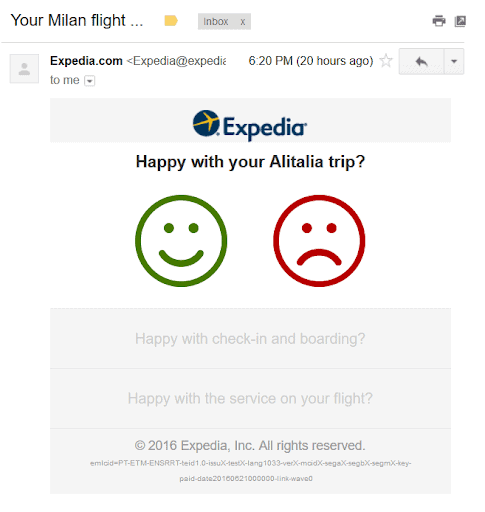
Email marketing is one of the best ways to get new clients and interact with existing customers. However, as there are plenty of content marketing strategies, you might get confused and get caught up in the latest trends. An email should create engagement and increase overall interactivity. Interactivity is considered one of this year’s most… Read more
-
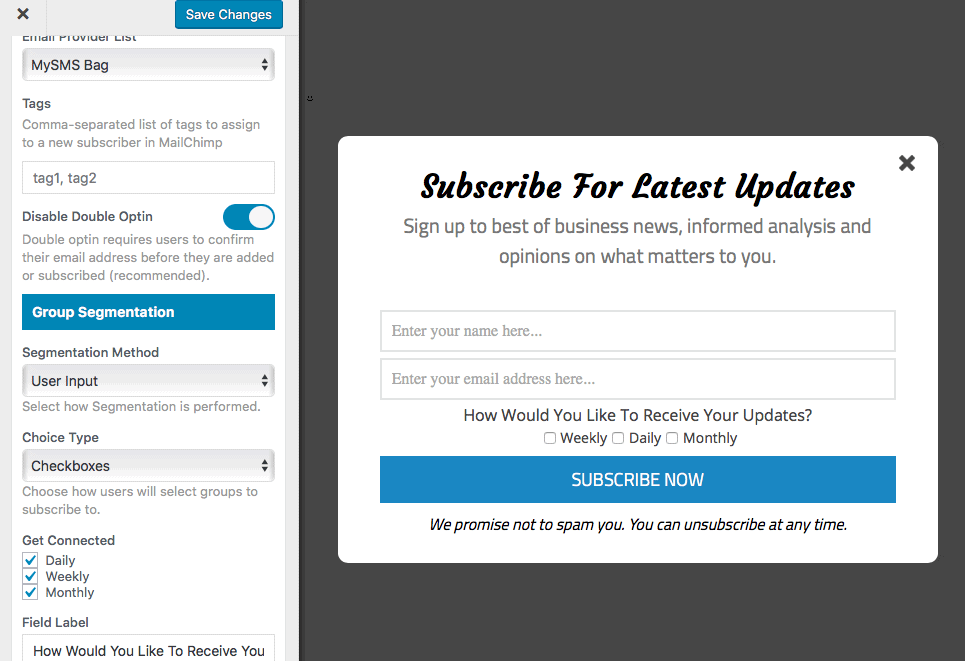
Allow Users Subscribe to Daily, Weekly & Monthly Email in WordPress
We are often asked about how to create a daily, weekly and monthly email newsletter in WordPress that will also allow users to choose the frequency (whether daily, weekly or monthly) of the newsletter. In this article, we will show you how to do this using MailChimp. Please ensure you have connected MailOptin to your… Read more
