Do you want to protect your website from spam with Akismet or reCAPTCHA, but aren’t sure which to choose?
Spam is a common problem for website owners, especially if you run a WordPress site with comments, contact forms, or user registrations. From fake submissions to bot-generated messages, spam can quickly get out of control if you don’t have the right protection in place.
Choosing between Akismet vs reCAPTCHA is an important decision to make when setting up spam protection. Both software are popular and effective, but they work in completely different ways.
Akismet focuses on automatically filtering spam in the background, while reCAPTCHA is designed to block bots by verifying that users are human.
So, which one is better for stopping spam? Should you rely on one or use both together?
In this guide, we’ll break down Akismet and reCAPTCHA in detail, including how each works, their pricing, and their pros and cons. We’ll also explore their core differences, help you decide which one fits your website best, and show you how to set up reCAPTCHA on any WordPress website using MailOptin.
What is Akismet?
Akismet is an excellent spam filtering service that helps website owners automatically block unwanted content. It is developed by Automattic, the same company behind WordPress, which is why it integrates so smoothly with WordPress websites.
At its core, Akismet is designed to handle one of the most frustrating parts of running a website: spam comments, fake form submissions, and malicious links.
Instead of requiring you to review every submission manually, it quietly runs in the background to detect and filter spam before it becomes a problem.
Another reason Akismet is so popular is its simplicity. Once installed and connected with an API key, it starts working immediately. There’s no need to configure complex rules or challenge your visitors with extra steps. Everything runs automatically, making it a great option for beginners and experienced users alike.
How Akismet Works
Now that you understand what Akismet is, the next question is simple: how does it actually stop spam?
Akismet works by analyzing every comment, form submission, or user input on your website and comparing it against a massive global database of known spam. This process happens instantly, and behind the scenes, so your visitors never notice anything.
Here’s a breakdown of how it works:
When someone interacts with your website, whether by leaving a comment, filling out a contact form, or signing up, Akismet immediately steps in behind the scenes. The process begins the moment that content is submitted, without requiring any action from the user.
Once the submission is made, the data is quietly sent to Akismet’s servers for inspection. This happens almost instantly, and the system begins comparing the content against its ever-growing database of known spam patterns collected from millions of websites.
At this stage, Akismet takes a closer look at several elements of the submission. It doesn’t just read the message itself; it also checks for suspicious links, evaluates the user’s IP address, and considers whether similar content has been flagged as spam elsewhere. These combined signals help it determine how trustworthy the submission is.
After analyzing all these factors, Akismet decides in real time. If everything looks clean, the content is approved and published normally. If something seems off, it may be sent straight to the spam folder or held for moderation, depending on your settings.
What makes this process so effective is how quickly it happens. From submission to decision, everything takes place within a fraction of a second, ensuring your site remains responsive and your users aren’t interrupted.
Akismet Pricing
Akismet offers flexible pricing based on how your website is used. For personal, non-commercial sites, there’s a free plan where you can pay what you want, including $0. This makes it a good option for bloggers or anyone running a site without earning from it.
For business websites, a paid plan is required, with pricing starting at $9.95 per month, billed yearly.
Pros of Akismet
- Automatic spam filtering: Akismet handles spam without needing your attention. Once it’s set up, it checks every comment and form submission independently. You don’t have to review each entry manually, which saves a lot of time.
- No interruption for users: Visitors can interact with your site freely. There are no checkboxes, puzzles, or extra steps to complete. This keeps the experience smooth and encourages more genuine engagement.
- Improves over time: Akismet learns from spam data collected across many websites. This shared knowledge helps it recognize patterns and become more accurate over time.
- Easy to set up and use: Getting started doesn’t take much effort. On WordPress sites, you just install it, connect your API key, and it begins working. There’s no need for complicated settings.
- Saves time and effort: Instead of sorting through spam messages every day, Akismet does the heavy lifting.
- Works with many plugins and forms: Akismet fits well with different parts of your website, including comment sections, contact forms, and registration forms. This makes it useful across various use cases.
Cons of Akismet
While Akismet does a great job at filtering spam, it’s not without a few downsides. Understanding these will help you decide if it’s the right fit for your website.
- Paid plans for commercial use: If your website makes money in any way, whether through products, services, or ads, you’ll need a paid plan. While the cost isn’t high, it can still feel like an extra expense.
- Occasional false positives: Like any spam filter, Akismet isn’t perfect. Sometimes, genuine comments or messages may be flagged as spam. This means you’ll still need to check your spam folder from time to time to make sure nothing important was missed.
- Limited outside WordPress: Akismet works best within the WordPress ecosystem. While it can be used with other platforms, the setup may not be as smooth, and integration options may be more limited than on WordPress sites.
- Not a complete spam solution on its own: Akismet focuses on filtering content after it’s submitted. It doesn’t stop bots from attempting to submit forms in the first place.
- Limited control over filtering rules: Akismet works automatically, which is great for convenience, but it also means you don’t have much control over how decisions are made. If you prefer to fine-tune your spam rules, you may find this limiting.
What is Google reCAPTCHA?
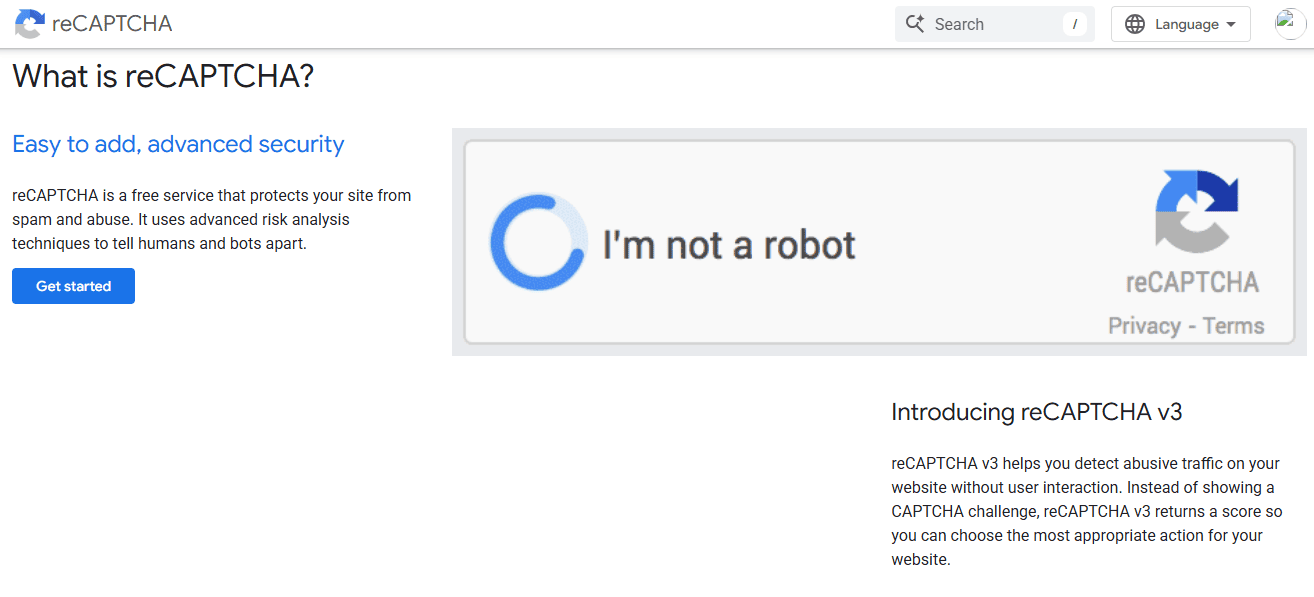
reCAPTCHA is a spam-protection system designed to distinguish real users from automated bots. Google developed it and is now used on millions of websites to prevent fake submissions, especially on login pages, contact forms, and registration areas.
If you’ve ever been asked to click a checkbox that says “I’m not a robot” or select images with traffic lights or crosswalks, then you’ve already interacted with reCAPTCHA. While those challenges are the most visible part of it, there’s actually a lot more happening behind the scenes.
At its core, reCAPTCHA focuses on user behavior rather than just the content being submitted. It looks at how someone interacts with a page, things like mouse movements, typing patterns, and how quickly a form is completed. These small signals help it decide whether the user is likely human or a bot.
In many cases, reCAPTCHA can make this decision without showing any challenge. If the system is confident that the user is legitimate, the form goes through without interruption. But if something seems suspicious, it may ask the user to complete a quick test to confirm they’re human.
This approach makes reCAPTCHA different from Akismet. While Akismet filters submissions after they are made, reCAPTCHA works at the front line, stopping bots before they can even submit anything. This can reduce the number of spam attempts your site receives in the first place.
Types of reCAPTCHA
reCAPTCHA comes in different versions, each designed to balance security and user experience in its own way. Depending on how you want your site to feel and how much protection you need, you can choose the version that fits best.
The most familiar type is the Checkbox reCAPTCHA (v2). This is the one with the “I’m not a robot” box. In many cases, users just click the checkbox and move on. However, if the system detects something unusual, it may ask for an extra step, such as selecting specific images. It’s easy to use, but those extra challenges can sometimes be annoying, especially on mobile devices.
Then there’s Invisible reCAPTCHA. As the name suggests, this version works quietly in the background. Users don’t see a checkbox or challenge unless something looks suspicious. If everything checks out, the form is submitted without interruption. This creates a smoother experience while still keeping bots away.
Finally, there’s reCAPTCHA v3, which takes things a step further. Instead of showing challenges, it assigns each visitor a score based on their behavior. You can then decide what to do with that score: allow the action, block it, or ask for additional verification. This version gives you more control, but it may require some setup to get the best results.
Each type has its place. If you want something familiar and easy, the checkbox version works well. If you prefer a cleaner experience for your visitors, invisible reCAPTCHA or v3 might be a better choice.
reCAPTCHA Pricing
reCAPTCHA uses a usage-based pricing model, which means you only pay based on how often it checks activity on your site. There’s a free tier that covers up to 10,000 monthly checks, making it suitable for small websites or low-traffic sites.
If your usage goes beyond that limit, pricing increases gradually based on the number of checks. This makes it affordable for growing websites.
Pros of reCAPTCHA
- Blocks bots before they submit anything: One of reCAPTCHA’s biggest strengths is that it stops spam at the entry point. Instead of waiting to filter content after it’s submitted, it prevents many bots from completing forms in the first place. This reduces the number of fake entries your site has to deal with.
- Works across different platforms: reCAPTCHA isn’t limited to one system. You can use it on WordPress, custom-built websites, and many other platforms. This makes it a flexible option if you manage different types of sites or plan to expand beyond one setup.
- Multiple versions to choose from: You’re not stuck with just one method. Whether you prefer a visible checkbox, invisible protection, or a score-based system, reCAPTCHA gives you options. This allows you to pick the version that matches your site’s needs and user experience.
- Free to start: Many websites can use reCAPTCHA without paying anything, especially if traffic is low to moderate. This makes it appealing for site owners who want effective spam protection without an upfront cost.
- Backed by Google’s technology, reCAPTCHA is developed by Google and benefits from large-scale data and advanced detection methods. This helps it stay effective against evolving bot behavior.
- Adds an extra layer of security: Beyond spam, reCAPTCHA can also help protect login pages and registration forms from automated attacks. This makes it useful not just for content filtering, but also for general site protection.
- Works silently when possible: With versions like invisible reCAPTCHA and v3, many users won’t see any challenge at all. The system runs in the background and only steps in when something looks suspicious, which helps maintain a smooth experience for real visitors.
Cons of reCAPTCHA
reCAPTCHA does a good job of stopping bots early, but it’s not perfect. There are a few downsides to be aware of before deciding whether it’s the right fit for your website.
- Can interrupt the user experience: One of the most common complaints is the extra step it adds for visitors. Image challenges or repeated checks can feel frustrating, especially on mobile devices. In some cases, users may abandon a form if the process becomes annoying.
- Accessibility concerns: Not every user can easily complete image-based challenges. People with visual impairments or certain disabilities may struggle, which can limit access to your site. Although there are audio options, they don’t always fully solve the problem.
- May affect conversions: Because it introduces friction, reCAPTCHA can reduce the number of completed form submissions. This is particularly important for contact forms, signups, or checkout pages where every conversion matters.
- Not 100% accurate: Even though it’s effective, reCAPTCHA can sometimes misjudge users. Real visitors may be flagged as suspicious and asked to complete multiple challenges, while some advanced bots may still find ways to get through.
Overall, reCAPTCHA is effective, but these trade-offs are worth considering, especially if user experience and accessibility are high priorities for your site.
Akismet vs reCAPTCHA: Core Differences
Now that you’ve seen how both options work on their own, it’s easier to understand where they truly differ. When people compare Akismet vs reCAPTCHA, they’re not just choosing between two similar solutions. They’re choosing between two completely different approaches to handling spam.
Below, we’ll break down the core differences between them so you can see how each one works in practice.
Spam Detection Method
The biggest difference comes down to how each handles spam.
Akismet focuses on the content being submitted. It reviews comments, messages, and form entries after they’ve been sent, then decides whether they look suspicious based on patterns and data collected from other websites.
reCAPTCHA, on the other hand, focuses on user behavior. It tries to figure out whether the person interacting with your site is human before the form is even submitted. If something seems off, it steps in to block or challenge the user.
In simple terms, Akismet filters spam after submission, while reCAPTCHA works to stop it before submission.
Ease of Use
Akismet is often easier to set up, especially if you’re using WordPress. Once you connect your API key, it starts working right away without much configuration.
reCAPTCHA requires a bit more effort. You’ll need to generate API keys, connect them to your site, and sometimes adjust settings depending on the version you choose. It’s not difficult, but it does take a few extra steps.
User Experience
This is where the difference becomes more noticeable for your visitors.
Akismet doesn’t interrupt users at all. Everything happens behind the scenes, so people can comment or fill out forms without any extra steps.
reCAPTCHA can sometimes interrupt the experience. While newer versions try to remain invisible, users may still be asked to check a box or solve an image challenge. For some, this is quick and easy. For others, it can feel like a small hurdle.
Accuracy and Reliability
Both options are effective, but they perform differently depending on the situation.
Akismet is very good at identifying spam, especially in comments and form messages. It benefits from shared data across many websites, which helps it catch patterns over time.
reCAPTCHA is better at identifying automated behavior. It can block bots before they even have a chance to submit anything, reducing the overall number of spam attempts.
Integration and Flexibility
Akismet works best within the WordPress environment. It integrates easily with comment systems, contact forms, and many plugins. However, outside WordPress, it may require extra setup.
reCAPTCHA is more platform-independent. It can be added to almost any website, whether it’s built with WordPress, another CMS, or custom code. This makes it a more flexible option if you’re working across different systems.
Pricing
Pricing is another important factor in this comparison.
Akismet offers a free plan for personal, non-commercial websites, while commercial websites require a paid plan. Paid plans start at $9.95 per month.
reCAPTCHA, on the other hand, has a free tier for up to 10,000 monthly checks, which is usually enough for small sites. Beyond that, it uses a usage-based model, where costs increase as traffic and bot activity grow. Enterprise options are available for high-traffic sites or businesses needing advanced features.
When you look at Akismet vs reCAPTCHA side by side, the choice becomes clearer. One focuses on filtering content quietly in the background, while the other acts as a gatekeeper at the front. Neither is universally better; it all depends on what you value more: a smoother user experience or early bot prevention.
Akismet vs reCAPTCHA: Which Should You Choose?
In this section, we will guide you through the best use cases for Akismet and reCAPTCHA so you can decide which solution or combination of both fits your website’s needs, traffic, and user experience.
When Akismet Makes Sense: Akismet is a great choice if your website relies heavily on user-generated content such as blog comments, contact forms, or community discussions. It works quietly in the background, reviewing every submission and filtering out anything that looks like spam.
When reCAPTCHA Is the Better Option: reCAPTCHA is the better option if your main concern is stopping bots from interacting with your site. It acts as a gatekeeper, checking whether a user is human before allowing them to submit forms or access certain features.
This makes it perfect for login pages, registration forms, and checkout pages where bot activity and automated attacks are more common. If your site experiences repeated spam attempts or suspicious traffic, reCAPTCHA helps reduce those issues right at the source.
Considering Both Together: In many cases, using both Akismet and reCAPTCHA provides the best results. reCAPTCHA reduces the number of spam attempts by blocking bots early, while Akismet filters any content that still manages to get through.
This combined approach is especially helpful for high-traffic websites, membership platforms, and ecommerce stores where both security and user experience matter. It gives you broader coverage without relying on a single method.
In the next section, we’ll show you how MailOptin uses Google reCAPTCHA to stop spam.
How MailOptin Uses Google reCAPTCHA to Stop Spam
MailOptin is an excellent WordPress plugin for lead generation, email automation, and newsletters. It helps you convert website visitors into subscribers and WordPress users, send one-off newsletters, and create automated, event-triggered follow-up emails, all from within WordPress.
It also helps protect your forms from spam using Google reCAPTCHA. Instead of allowing bots to flood your forms with fake signups, MailOptin ensures that only real users can subscribe to your email list.
Adding Google reCAPTCHA to MailOptin Forms
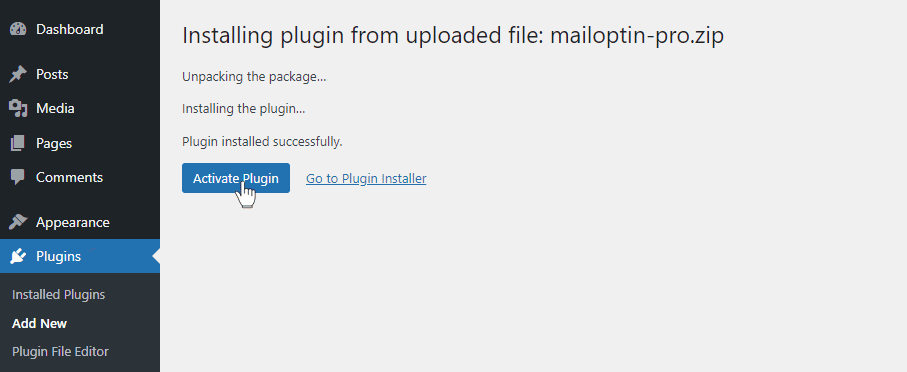
To get started, purchase a MailOptin plan and download the plugin from your welcome email or MailOptin account. Then, upload and install the plugin on your WordPress website.
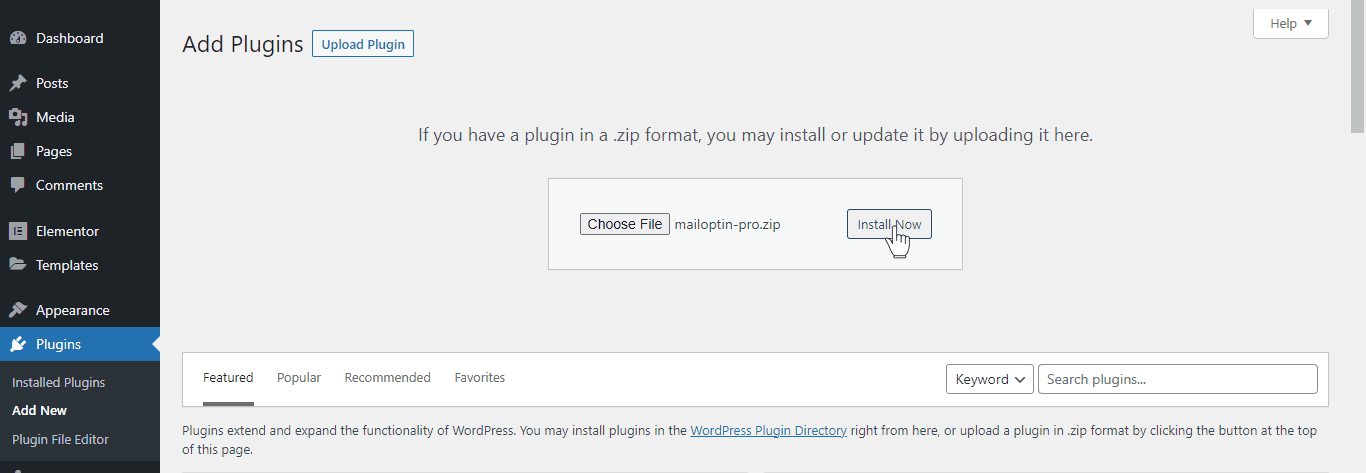
Once installed, click “Activate Plugin”.
Next, go to the Google reCAPTCHA admin console and register your website. Once that’s done, you’ll receive a site key and a secret key. Copy both and head back to your WordPress dashboard.
Navigate to MailOptin > Settings, then open the reCAPTCHA tab.
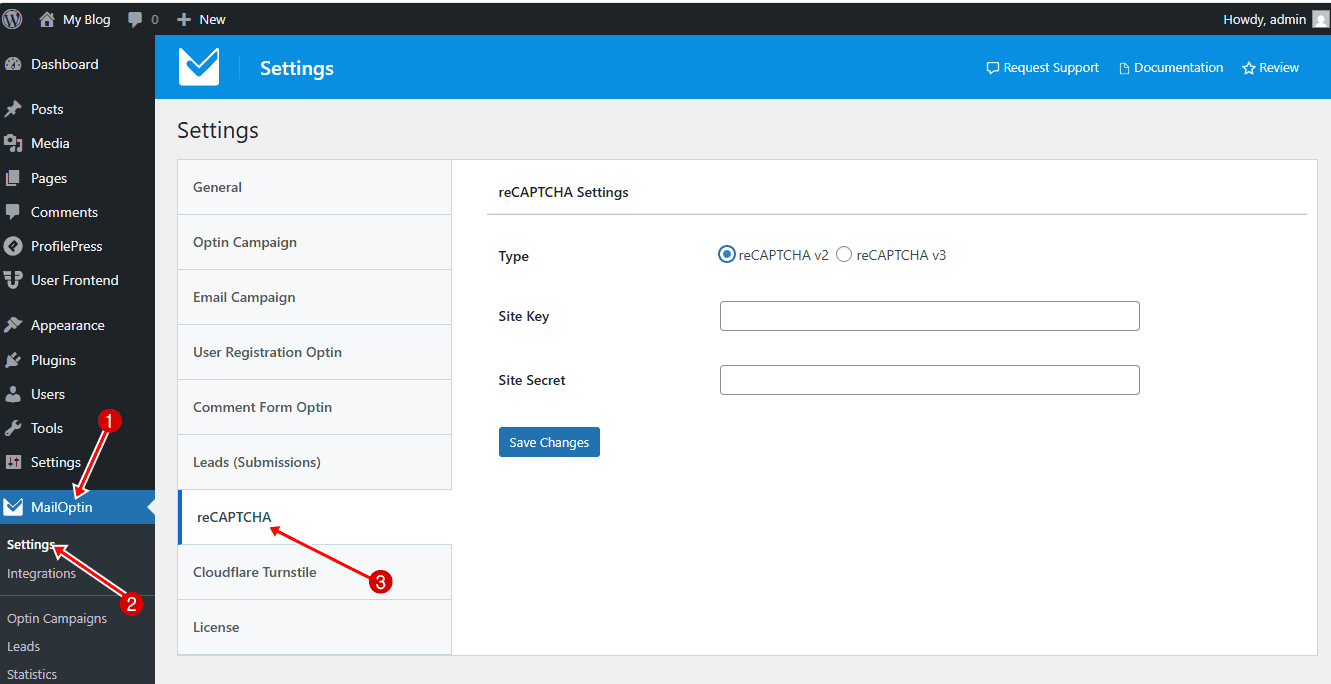
Choose the reCAPTCHA version you prefer, then paste your site key and secret key. After that, click Save Changes to apply your settings.
Next, go to MailOptin > Optin Campaigns and open the form where you want to add reCAPTCHA.
Then, go to the Fields panel, add a new field, and select either reCAPTCHA v2 or reCAPTCHA v3, depending on your preference.
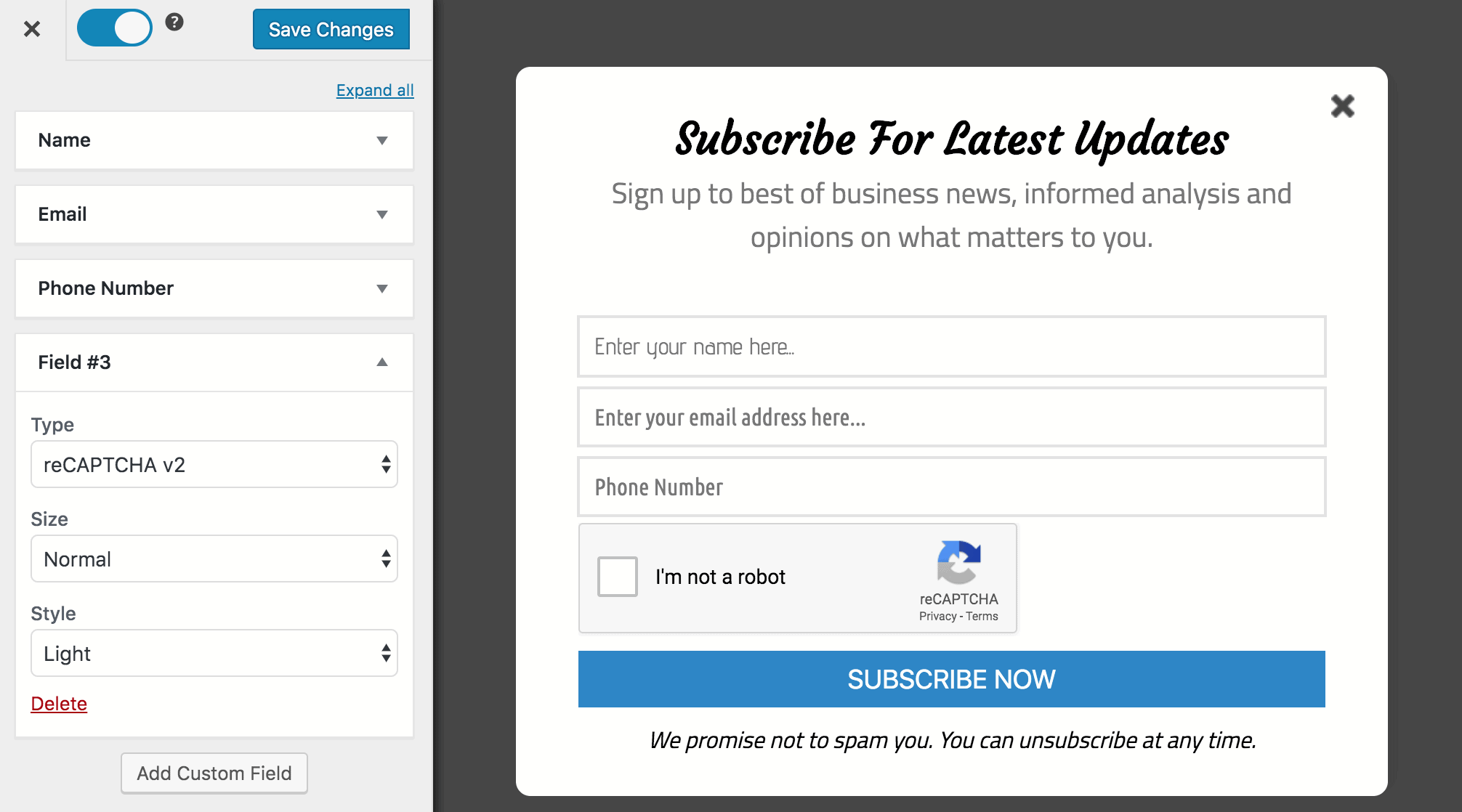
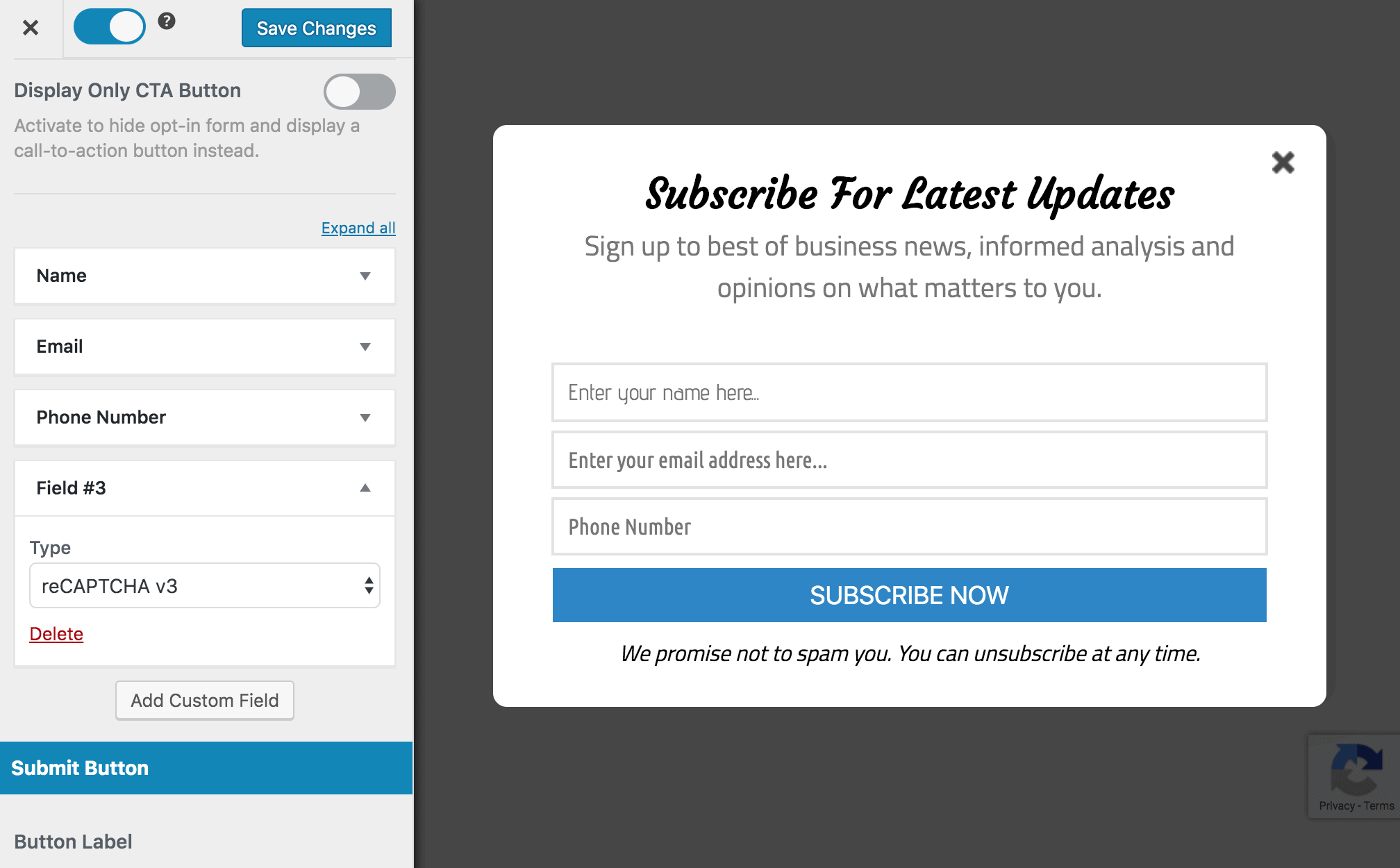
Save your changes once you’re done.
Finally, preview the form on your site. If you selected v2, you’ll see the checkbox appear on the form. If you chose v3, you’ll notice the badge displayed in the bottom-right corner of the screen.
With this setup, your forms are now protected from spam and bot submissions. reCAPTCHA will verify each user before they can submit the form, helping you keep your email list clean and filled with real subscribers.
Best Practices to Stop Spam Effectively
By now, you’ve seen how Akismet and reCAPTCHA work, but beyond choosing the right solution, here are a few practical steps you can take to keep spam under control and maintain a clean, secure site.
- Use a layered approach: Relying on just one method is rarely enough. Spam bots are getting more advanced, and a single line of defense can be bypassed. That’s why combining solutions works so well. For example, you can use reCAPTCHA to stop bots before they submit forms, while Akismet filters anything that manages to get through. Together, they cover both ends of the process.
- Protect all entry points: Most people focus only on comment sections, but spam can come from many places. Registration forms, login pages, contact forms, and even checkout pages are common targets. Make sure every entry point on your site is protected, especially if you allow user signups or accept payments.
- Enable email verification: Adding email confirmation during registration helps reduce fake accounts. Bots often use temporary or invalid email addresses, so requiring users to verify their email before accessing your site can filter out many spam registrations.
- Limit repeated attempts: Bots often try to submit forms multiple times within seconds. Setting limits on how often a user can attempt to log in or submit a form can help reduce this behavior. This also protects your site from brute-force login attempts.
- Block suspicious email domains: If you notice repeated spam from certain email domains, you can block them entirely. Many spam accounts use disposable email services, so restricting these domains can cut down a large portion of unwanted registrations.
- Monitor spam activity regularly: Even with protection in place, it’s a good idea to check your spam logs from time to time. This helps you understand what’s being blocked and whether any legitimate users are being flagged by mistake. Small adjustments can improve accuracy over time.
Akismet vs reCAPTCHA FAQs
When choosing between Akismet vs reCAPTCHA, it’s normal to have a few questions. Below are some of the most common ones, along with answers.
Q1. Is Akismet better than reCAPTCHA?
It depends on what you need. Akismet is great at filtering spam after it’s submitted, especially for comments and form entries. reCAPTCHA, on the other hand, focuses on stopping bots before they can submit anything. If your goal is to reduce spam submissions entirely, reCAPTCHA helps at the entry point. If you want clean, filtered content, Akismet does that well. Many site owners use both for better results.
Q2. Can I use Akismet and reCAPTCHA together?
Yes, and it’s often the best approach. Google reCAPTCHA can block bots from accessing your forms, while Akismet filters anything that gets through. This combination gives you better coverage and reduces the chances of spam appearing on your site.
Q3. Does reCAPTCHA affect user experience?
It can, depending on the version you use. Checkbox and image challenges may slow users down or be frustrating. However, invisible reCAPTCHA and v3 reduce this by working in the background most of the time. Choosing the right version helps balance security and user experience.
Q4. Which one is better for WordPress sites?
Akismet fits naturally into WordPress and is very easy to use, especially for blogs and content-heavy sites. Google reCAPTCHA also works well with WordPress, but it may require a bit more setup. If you want something that runs quietly in the background, Akismet is a great choice.
Q5. Do I need technical skills to set these up?
Not really. Both Akismet and reCAPTCHA are fairly easy to set up, especially when using WordPress plugins like ProfilePress and MailOptin. These plugins make the process easier by letting you manage everything from one place without dealing with complicated configurations.
Q6. Will spam protection slow down my website?
No. Both Akismet and reCAPTCHA are designed to run efficiently. Akismet processes data in the background, while reCAPTCHA handles checks quickly before submission. When set up properly, they won’t noticeably affect your site’s performance.
Akismet vs reCAPTCHA: Our Verdict
When it comes to protecting your website from spam, both Akismet and reCAPTCHA have their strengths.
Akismet excels at automatically filtering submitted content, keeping your site’s comments, registrations, and forms clean without interrupting real users. reCAPTCHA, on the other hand, acts as a first line of defense by blocking bots before they can even reach your forms, reducing spam attempts at the source.
We recommend using both together. Akismet helps catch what slips through, while reCAPTCHA blocks suspicious activity from the start, giving your website stronger overall protection.